
Last updated on
Nov 6, 2026
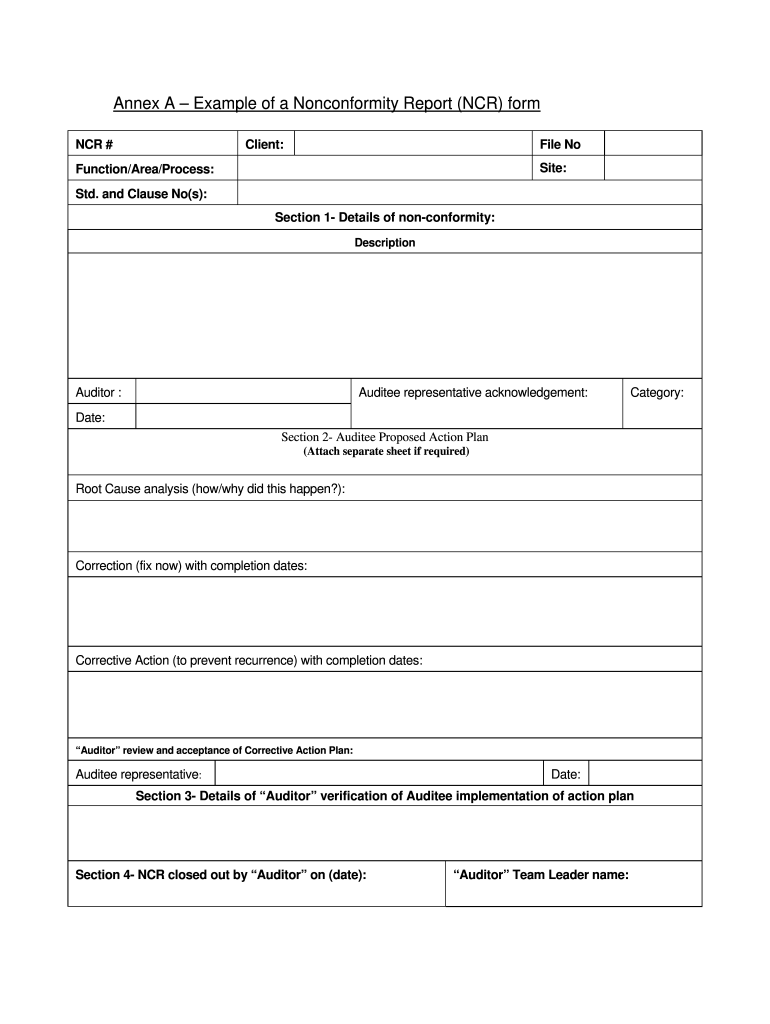
Annex A - Example of Nonconformity Report NCR free printable template
We are not affiliated with any brand or entity on this form

Fill out
Complete the form online in a simple drag-and-drop editor.

eSign
Add your legally binding signature or send the form for signing.

Share
Share the form via a link, letting anyone fill it out from any device.

Export
Download, print, email, or move the form to your cloud storage.
Why pdfFiller is the best tool for your documents and forms


End-to-end document management
From editing and signing to collaboration and tracking, pdfFiller has everything you need to get your documents done quickly and efficiently.
Accessible from anywhere
pdfFiller is fully cloud-based. This means you can edit, sign, and share documents from anywhere using your computer, smartphone, or tablet.
Secure and compliant
pdfFiller lets you securely manage documents following global laws like ESIGN, CCPA, and GDPR. It's also HIPAA and SOC 2 compliant.
What is Annex A - Example of Nonconformity Report NCR
The Nonconformity Report Form is a business document used by auditors and auditee representatives to document and manage nonconformities found during audits.
pdfFiller scores top ratings on review platforms




So far it is been a good experience you send a PDF filler Stephanie could have a little bit too exciting but I'm just starting to get yes of it
Great alternative to Adobe for me. I use the tool form simple purposes and it works great.
Who needs Annex A - Example of Nonconformity Report NCR?
Explore how professionals across industries use pdfFiller.

Annex A - Example of Nonconformity Report NCR is needed by:
-
Auditors conducting quality audits
-
Quality assurance teams in organizations
-
Compliance managers overseeing regulatory requirements
-
Auditee representatives dealing with corrective actions
-
Consultants advising on audit processes
-
Business administrators managing audit reports
Comprehensive Guide to Annex A - Example of Nonconformity Report NCR
Overview of the Nonconformity Report Form
The Nonconformity Report (NCR) form serves a critical role in compliance and quality assurance by documenting nonconformities identified during audits. This form is essential for ensuring that issues are recorded accurately and addressed effectively. It is also vital to obtain signed acknowledgment from both the auditor and the auditee representative to formalize the documentation process.
Utilizing the audit nonconformity form not only facilitates compliance but also promotes a culture of transparency and accountability within organizations.
Purpose and Benefits of Using the Nonconformity Report Form
The NCR form is indispensable for organizations aiming to maintain high-quality standards. By using this form, issues can be identified, documented, and resolved efficiently, thus fostering continuous improvement. Structured documentation significantly enhances the quality audit process and provides a reliable foundation for future audits.
Furthermore, this form aids in tracking corrective actions through a comprehensive corrective action plan form, making it easier for organizations to implement necessary changes.
Key Features of the Nonconformity Report Form
The Nonconformity Report Form comprises several critical sections designed to capture essential information during an audit. Key sections include the NCR number, client identification, and a dedicated area for root cause analysis. Checkboxes are included for user inputs alongside detailed instructions, streamlining the form-filling process.
This structured format, provided in the ncr form template, ensures that all necessary information is gathered systematically, leading to effective documentation.
Who Should Use the Nonconformity Report Form?
The NCR form is intended for various stakeholders involved in the auditing process. Key users include auditors and auditee representatives, both of whom must sign the form to validate its contents. This form is also relevant for professionals such as audit teams and quality assurance managers who need to ensure compliance and document discrepancies effectively.
Understanding the roles and responsibilities of users is vital to ensuring the effectiveness of the nonconformity report form.
How to Fill Out the Nonconformity Report Form Online
Completing the NCR form online requires careful attention to detail. Here is a step-by-step guide on filling out the form:
-
Begin by entering the NCR number and client details.
-
Provide a description of the nonconformity observed during the audit.
-
Conduct a root cause analysis and note findings in the specified section.
-
Document proposed corrective actions to address the issue.
-
Ensure both auditor and auditee representative sign and date the form.
Pay attention to common errors, such as incomplete fields, to ensure a smooth submission process.
Submission Process for the Nonconformity Report Form
Once the NCR form is filled out, submission can occur through various methods, including electronic submission and hard copies. It is essential to follow the specified guidelines for submission to ensure proper tracking and confirmation of the form.
Users should be aware of how to check the status of their submission for effective audit management, enabling proactive follow-up on outstanding issues.
Security and Compliance Considerations
Handling of the Nonconformity Report Form necessitates stringent security measures to protect sensitive information. pdfFiller adheres to industry standards such as HIPAA and GDPR, ensuring that all data is managed in compliance with legal requirements. Security features, including 256-bit encryption, provide additional safeguards for safeguarding documents.
Implementing these measures not only fosters trust but also enhances the secure handling of the nonconformity report form.
Showcasing a Completed Example of the Nonconformity Report Form
Providing a visual representation of a filled NCR form enhances understanding of the documentation process. An annotated example can illustrate the important sections and typical inputs expected in the form.
Viewing a completed form is invaluable for users, as it helps clarify the necessary steps to take when documenting nonconformities.
Enhancing Your Document Management with pdfFiller
pdfFiller significantly streamlines the process of completing and managing the Nonconformity Report Form. Its tools for editing, e-signing, and securely storing documents offer users a comprehensive solution for handling forms.
The platform’s user-friendly interface and efficient editing capabilities improve the experience of filling out the NCR form online, enabling users to focus on compliance management.
Seamlessly Fill and Submit Your Nonconformity Report Form Today!
Engaging with pdfFiller provides a secure and efficient way to complete your NCR form. The platform’s comprehensive features ensure that users can navigate the complexities of compliance management effectively.
By choosing pdfFiller, you gain the assurance of robust document management while achieving effective oversight of your nonconformance processes.
How to fill out the Annex A - Example of Nonconformity Report NCR
-
1.To access the Nonconformity Report Form, visit pdfFiller's website and log in to your account.
-
2.Use the search bar to find the form by entering 'Nonconformity Report Form'.
-
3.Click on the form title to open it in the pdfFiller interface.
-
4.Review the fields displayed on the form to identify what information you need to complete.
-
5.Gather all necessary details including the nonconformity description, root cause analysis, and corrective action proposals beforehand.
-
6.Start filling out the form by clicking on the designated fields and typing directly into them.
-
7.Use dropdown menus to select options where applicable, ensuring all required fields are filled out.
-
8.If you need assistance, refer to the instructions provided for filling out key sections of the form.
-
9.Once all information is entered, review the completed sections for accuracy and completeness.
-
10.Take your time to ensure that signatures from both the auditor and auditee representative are included and dated appropriately.
-
11.After reviewing, save your changes regularly to avoid losing any information.
-
12.When finished, save the document as a PDF, or download it for your records directly from pdfFiller.
-
13.You can also submit the completed form electronically or share it with relevant stakeholders through email.

Who is eligible to use the Nonconformity Report Form?
The form is intended for auditors and auditee representatives who are involved in the audit processes and need to document any nonconformities identified. It is applicable for businesses subject to quality audits.
What deadlines should I be aware of when submitting this form?
Ensure the form is completed and signed during or immediately after the audit process. This timely submission is crucial for effective corrective action planning.
How can I submit the Nonconformity Report Form?
You can submit the form electronically through pdfFiller or download it to submit via email or print. Ensure that all required signatures are included before submitting.
What supporting documents do I need to attach?
While specific attachments are not outlined, it's recommended to include any relevant documentation that supports the nonconformity claims, such as previous audit reports or corrective action plans.
What are common mistakes to avoid when completing this form?
Common mistakes include missing signatures, incomplete fields, or failing to include a thorough root cause analysis. Always double-check for these before finalizing.
How long does it take to process the Nonconformity Report Form once submitted?
Processing times can vary depending on the organization's review procedures. Generally, expect feedback within a few days to weeks depending on the audit cycle.
Are there any fees for using the Nonconformity Report Form?
Using the Nonconformity Report Form through pdfFiller may involve standard subscription fees or charges based on usage, depending on your chosen plan.
Related Content
Related Forms



Related Catalogs
Get the latest insights from our blog


If you believe that this page should be taken down, please follow our DMCA take down process
here
.
This form may include fields for payment information. Data entered in these fields is not covered by PCI DSS compliance.